envirou
Manage your shell environment with Envirou
This project is maintained by sverrirab
envirou - View and manage your shell environment


Envirou (ev) helps you to quickly view and configure your shell
environment. Display important variables with nice formatting and hide the ones you don’t care about. No more custom shell scripts to configure your environment or guessing which one is active!
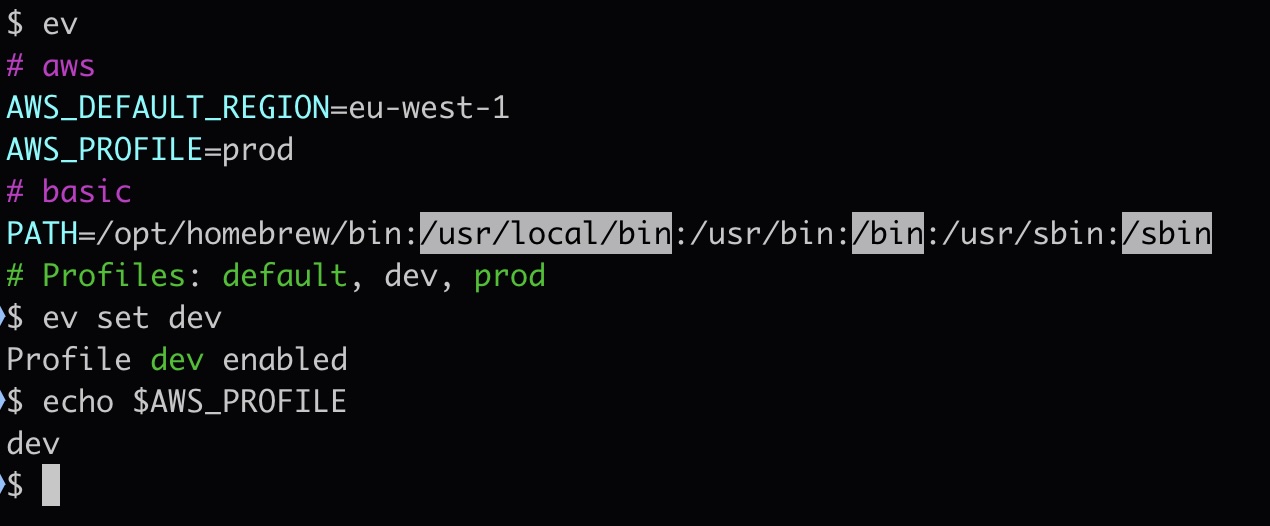
Key highlights
- Works with any other tool - just views and optionally sets environment variables.
- Compact output (replaces
$HOMEwith~and highlights paths for readability). - Hides all irrelevant variables such as
TMPDIR,LSCOLORSetc. - Fully customizable.
- Works on Mac + Linux (bash + zsh) and Windows (bat and PowerShell).
- Fully standalone go binary.
- Optional command completion for bash, zsh, fish and PowerShell (manual setup).
- Encrypt secret values in profiles and .env files (encryption guide).
- Includes oh-my-zsh theme and PowerShell prompt script.
Why?
Everyone that works with complex infrastructure or multiple development environments from the command line know the feeling of using the wrong toolchain or environment and having the nagging suspicion that you have mixed something up in your configuration. Classical examples are PATH’s to tools/SDK versions, external service endpoints for your PROD and DEV environments etc.
Install
Binary download (all platforms): grab the latest release from the releases page. This is the recommended method on Windows.
Homebrew (macOS/Linux):
brew install sverrirab/tap/envirou
Go install:
go install github.com/sverrirab/envirou@latest
Scoop (Windows, experimental)
Scoop support is experimental and may not work reliably. ```powershell scoop bucket add sverrirab https://github.com/sverrirab/scoop-bucket scoop install envirou ``` If you run into issues, use the binary download above instead.Quickstart
Run envirou to view your current environment or envirou help for more information.
Shell integration
To get the full power of envirou you need to allow it to modify your environment (switch profiles).
This requires it to run in the context of the current shell via the ev wrapper function.
The easiest way to install is:
envirou install
This auto-detects your shell and adds the bootstrap line to your profile.
Use --prompt to add active profiles to your Bash, Zsh, or PowerShell prompt,
or --dry-run to preview changes. Prompt integration is opt-in and preserves
the existing Bash/Zsh prompt.
Automatic installation supports Bash, Zsh and PowerShell; for Windows CMD use the
manual envirou bootstrap bat setup described below.
You can also specify the shell explicitly:
envirou install zsh
envirou install zsh --prompt
envirou install powershell --prompt
To remove: envirou install --uninstall
Manual installation (if you prefer not to let envirou modify your profile)
You can use `envirou install --dry-run` to see exactly what would be added and where, or add the bootstrap line yourself: **Bash** — add to `.bashrc` (or `.bash_profile` on macOS): ```bash eval "$(envirou bootstrap bash)" ``` **Zsh** — add to `.zshrc`: ```bash eval "$(envirou bootstrap zsh)" ``` Add `--prompt` to the Bash or Zsh bootstrap command to prepend active profiles without replacing the existing prompt. With Oh My Zsh, load it after `source $ZSH/oh-my-zsh.sh`. Flags can be combined for a single opt-in setup: ```zsh source <(envirou bootstrap zsh --completion --prompt) ``` **PowerShell** — add to `$PROFILE`: ```powershell Invoke-Expression (& envirou bootstrap powershell) ``` To also customize your PowerShell prompt with active profile display: ```powershell Invoke-Expression (& envirou bootstrap powershell --prompt) ``` **Windows CMD**: see `envirou bootstrap bat` To uninstall manually, remove the line you added above from your shell profile.For more details:
Commands
Everyday use
| Command | Description |
|---|---|
ev |
Display current environment (grouped and formatted) |
ev set PROFILE [...] |
Activate one or more profiles (alias: .) |
ev find PATTERN |
Search env variable names and values (alias: search) |
ev path [VAR] |
Display path-like variables one entry per line |
ev profiles |
List all profiles (alias: profile, p) |
ev groups |
List all configured groups (alias: group, g) |
Searching
| Command | Description |
|---|---|
ev find PATH |
Substring — matches PATH, CLASSPATH, PATH_INFO, … |
ev find 'PATH*' |
Prefix — matches PATH, PATH_INFO but not CLASSPATH |
ev find '*PATH' |
Suffix — matches PATH, CLASSPATH but not PATH_INFO |
ev find --name PATH |
Search names only |
ev find --value /usr/local |
Search values only |
ev find -i path |
Case-insensitive search |
Patterns without * are treated as substring matches. Add * to restrict to prefix or suffix matching — the same glob syntax used in config groups. Quote patterns containing * to prevent your shell from expanding them (e.g., ev find 'PATH*' not ev find PATH*).
Most commands have short aliases shown in the table above. Additionally ev dotenv can be written as ev .env.
Inspecting path variables
| Command | Description |
|---|---|
ev path |
Show all path-like variables with one entry per line |
ev path PATH |
Show a specific variable |
ev path --check |
Flag missing directories and duplicates |
See the path guide for details.
Loading environment files
| Command | Description |
|---|---|
ev dotenv |
Load variables from .env in current directory |
ev dotenv FILE [...] |
Load one or more specific .env files (last wins) |
See the dotenv guide for syntax details and examples.
Tracking changes
| Command | Description |
|---|---|
ev snapshot |
Save current environment as a baseline (alias: snap) |
ev diff |
Show what changed since the snapshot |
ev diff --save NAME |
Create a new profile from the changes |
ev snapshot --reset |
Remove the saved snapshot |
See the snapshot and diff guide for a walkthrough.
Encrypted values
| Command | Description |
|---|---|
envirou encrypt |
Encrypt a value for use in profiles or .env files |
envirou decrypt TOKEN |
Decrypt a token to verify it |
ev unlock |
Enter the passphrase once for this shell session |
ev lock |
Clear the encryption key from this session |
See the encryption guide for setup and security notes.
Configuration
| Command | Description |
|---|---|
envirou install |
Auto-install shell integration into your profile |
envirou install --uninstall |
Remove shell integration from your profile |
ev config |
Open config file in $EDITOR |
ev bootstrap bash\|zsh\|powershell\|bat |
Output shell integration script |
envirou bootstrap SHELL --completion |
Output shell integration with completion for envirou and ev |
envirou completion bash\|zsh\|fish\|powershell |
Output tab completion script (guide) |
ev version |
Show version information |
Run ev help or ev [command] --help for full usage details.
The configuration file is stored at ~/.config/envirou/config.ini, where ~ is
your user home directory as reported by the operating system. Set the
ENVIROU_CONFIG_DIR environment variable to use a different directory, or pass
--config to point at a specific file.
First time use
After installing and adding the shell integration, start a new shell and run
ev -a to list all environment variables grouped by category. Run ev help
for details of all available commands.
Next step is to check out ev config and start modifying the configuration. Create your own groupings and profiles!
Example use cases
AWS configuration
Add all your aws profiles in ~/.aws/config. Then create an Envirou profile for each
that sets the AWS_PROFILE variable to the name of the AWS profile. This way you can
easily e.g. switch between dev and prod or even the default region or output formatting.
Kubectl configuration
Copy your ~/.kube/config into a new file for each environment. Create an Envirou
profile for each that sets the KUBECONFIG pointing to each file.
Make sure you set the default context in each file to be the correct one. This way you can create different profiles that for example have a different default namespace.
Example configuration
[profile:basic]
PATH=/usr/local/bin:/usr/bin:/bin:/usr/sbin:/sbin
VIRTUAL_ENV
AWS_PROFILE

[profile:py3]
PATH^=/Users/sab/sdk/py3/bin
VIRTUAL_ENV=/Users/sab/sdk/py3

[profile:py2]
PATH^=/Users/sab/sdk/py2/bin
VIRTUAL_ENV=/Users/sab/sdk/py2

[profile:awsprod]
AWS_PROFILE=prod

[profile:awsdev]
AWS_PROFILE=dev
Now you can switch profiles by running ev set py3 awsprod.
See the profiles guide for more details on creating and using profiles, including ^= (prepend) and += (append) operators for PATH-like variables.
Where does the name come from?
The name Envirou is inspired by Spirou the comic book character.
The alias ev is both short for Envirou and env.
License
Free for any use see MIT License for details.